

Magento is a Ferrari with square wheels. Plenty of power under the bonnet (catalogue, checkout, EAV, indexing… the whole arsenal), but the moment you put your foot down in production, TTFB reminds you the wheels aren’t round. A typical installation without a CDN sits somewhere around 800-2000 ms TTFB. You can bolt on a local Varnish and it helps, sure, but then you’re stuck hand-writing VCL, maintaining it, and the content still never leaves your origin server — so if your customer is in Buenos Aires, they’ll notice. In today’s post we look at how we built a CDN plugin to speed up TTFB on Magento 2. Let’s get into it.
Why build a CDN plugin for Magento 2
Most CDNs don’t solve the problem at the root: either they expect you to edit the setup yourself, or they simply don’t speak Magento’s language. When an admin saves a product, the CDN has no idea. It keeps serving the old version until the TTL expires or someone manually purges the entire site — with the side effect of throwing away the cache for the 9,999 pages that hadn’t even changed.
So we did what people who really can’t stand something tend to do: we fixed it ourselves. The result is Transparent Edge’s official plugin for Magento 2 — open source, MIT licence, built by people who’ve spent as much time staring at Varnish logs as debugging Magento observers.
What it actually does (and what it doesn’t force you to do)
The plugin hooks into Magento’s lifecycle (product, category, CMS, block, price, reindex) and translates every change into surgical invalidations sent to the CDN. No touching VCL. No local Varnish. No need for the store admin to learn what a ban is. You install it, fill in four connection details, and the plugin starts talking to the CDN on your behalf.
Installation is via composer require or a manual copy of the module — no odd scripts, no exotic dependencies. The plugin’s GitHub repository has the exact package name and detailed steps.
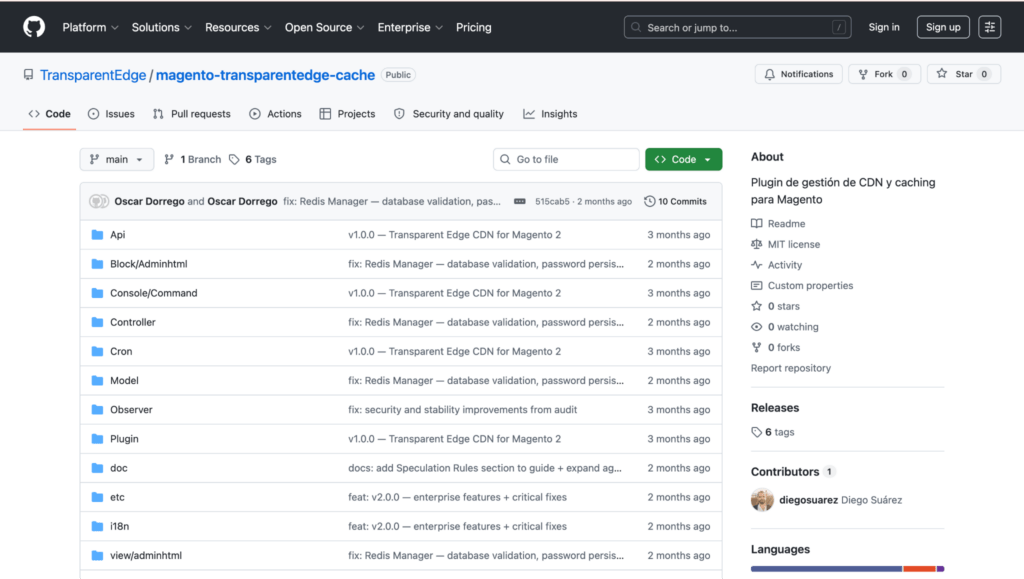
Once installed, you’ve got 46 PHP classes with PSR-4 and strict types quietly working away in the background, spread across six observers and three plugins (AOP interceptors) that hook into Magento’s events without the core ever knowing they’re there.
Three performance improvements the plugin brings
The crown jewel: surgical invalidation with surrogate keys
This is where the plugin stops being just another cache connector and becomes something more. Every HTTP response from Magento goes out with a Surrogate-Keys header tagging the content:
Surrogate-Keys: product-123 category-5 block-footer te-allWhen the admin saves product 123, the plugin doesn’t say “purge everything.” It says “purge product-123” and that’s it. The remaining 9,999 catalogue pages stay exactly where they were: warm, served from the edge, never touching origin.
It’s the difference between a surgeon and a hammer. The hammer solves the problem too, but at the cost of everything around it.
And this isn’t a marketing promise. In tests on a 181-product catalogue, a single product invalidation generated 1,463 tags processed in 15 batches of 100, in under 2 seconds. Surgical, measured in milliseconds.
To keep this from spiralling, there’s an automatic threshold: if an operation accumulates more than 5,000 tags, the plugin decides on its own that fine-grained invalidation is no longer worth it and fires a full ban instead. And there are 28 filtered tag prefixes (paycomet_, payment_, token_, quote_…) so the CDN is never sent data that should never be cached in the first place.
Speculation Rules: the page loads before you even click
This is the part we most enjoy showing off full-screen. The plugin automatically generates a Speculation Rules JSON (supported since Chrome 109, Edge 120 and Safari 18) that tells the browser: “when the user hovers over this link, start downloading the page now, before they even click.”
In Balanced mode, hovering over a product triggers the preload. By the time the user actually clicks, the page is already there. Instant loading, a native-app feel, zero extra JavaScript on the frontend.
In version 2.0.0 this has become contextual by page type:
On a PLP (category listing), the first three visible products are prerendered. On a PDP (product page), the parent category and related products are prefetched. On the homepage, the main menu categories are prerendered.
The nerdy detail: this JSON is served from its own endpoint (/transparentedge/speculationRules/index) with Content-Type: application/speculationrules+json — and here’s the inception moment — it’s cached on the CDN itself, with its own Surrogate-Key. In other words, the CDN caches the instructions that tell the browser to use the CDN faster. Like The Matrix, but with fewer bullets and more HTTP headers.
For safety, there are more than 40 exclusions configured out of the box: checkout, customer, payment gateways, REST, GraphQL. No accidentally preloading a page containing sensitive customer data.
i3: WebP, AVIF, watermarks, custom captions — all without touching a single file
Let’s cover the most common use case, though you can do a lot more. Catalogue images are converted to WebP or AVIF on the fly, at the edge, depending on what the requesting browser supports. No copies are generated on your server, URLs don’t change, there’s no SEO impact, and you don’t need any new PHP extensions. The original image stays exactly as it is; the transformation happens at the moment it’s served.
Technically, the plugin adds the header TCDN-i3-transform: auto_webp:85% in the VCL, and format negotiation happens automatically based on the browser’s Accept header. You don’t choose the format — each visitor’s browser does.
Tools for developers and sysadmins
WPO: hints the browser thanks you for, without even asking
Beyond images, the plugin analyses every HTML response and automatically adds:
<link rel="preload"> for the LCP image, critical CSS and fonts (between 3 and 5 hints depending on the page) <link rel="dns-prefetch"> for detected external domains (up to 8) loading="lazy" on iframes and videos
All of this without JavaScript, without touching your theme, without getting anywhere near RequireJS. The HTML leaves Magento, passes through the plugin, and reaches the browser already optimised.
Redis, in one click (with a safety net)
If you’re still running file-based cache in 2026, this panel is for you. The plugin automatically detects Redis — localhost, Docker, Unix sockets — shows you its version and memory usage, and enables Object Cache, FPC and Sessions with a single click. Before touching anything, it automatically backs up your env.php, so if anything goes wrong you have instant rollback.
The security audit covered this module specifically: SSRF protection in the Redis Manager, the client secret encrypted in the database, the admin cookie flagged Secure, and internal headers stripped in production so nothing is exposed that shouldn’t be.
VCL Generator: copy, paste, it works
If you’ve never written a line of VCL, don’t worry. The plugin generates the complete VCL for the Transparent Edge dashboard: admin bypass, cookie stripping on static assets, removal of tracking parameters (UTM, gclid, fbclid), i3 rules for images, and the correct TTLs for each content type.
Copy it, paste it into the dashboard, deploy. Done.
sub vcl_recv {
if (req.url ~ "^/admin") {
return (pass);
}
# strip tracking parameters
set req.url = regsuball(req.url, "([?&])(utm_[a-z]+|gclid|fbclid)=[^&]+", "\1");
set req.url = regsub(req.url, "[?&]$", "");
}
The snippet above is purely illustrative of the type of rules covered — the actual VCL is generated by the plugin according to your configuration.
Import mode: 700,000 products without blinking
If you’ve ever run a bulk import or a full reindex, you know what happens when your CDN integration isn’t built for it: thousands of individual invalidations, a saturated API, and a long while staring at the terminal with a resigned look on your face.
The Magento 2 cache plugin automatically detects CLI context (imports, reindex) and suspends individual invalidations for the duration of the process. Once it’s finished, it fires a single, total ban. No 700,000 API calls, no overhead, no hammering the CDN.
Observability: health check and dashboard
GET /transparentedge/status/health returns a JSON with the plugin’s full status (CDN connection, active features, cache backend, version), designed to plug into Datadog, Kubernetes liveness probes, or whatever monitoring system you already have running.
And for day-to-day use, there’s a widget on the Magento admin homepage showing CDN status, active features, and quick links to configuration, purge and the Transparent Edge dashboard. One glance tells you whether everything’s working, with no need to dig into any submenu.
How to start using the CDN plugin for Magento 2
Install it from the plugin’s GitHub repository: https://github.com/TransparentEdge/magento-transparentedge-cache Check the configuration documentation If you’re already a Transparent Edge customer, activate it from your dashboard If you have technical questions or want a demo before putting it into production, write to us at help+cdn@transparentedge.eu
That’s it. Your Magento now has the engine. This is the round tyres.

Oscar Dorrego is Presales at Transparent Edge.
Psychologist by training, computer scientist by hobby, pre-sales by profession, new romantic at heart. He does so many things that he doesn’t even remember what he really does. More left hand than Nadal. Living between business and technology allows him to have half the joys and twice the worries, but it is impossible to make a dent in the spirit of our favorite snake charmer.